Animation Draw: Flip Maker
- 4.5
- Rating
- 500.00K
- Installs
- Free
- Price
 Analysis by App-foxy
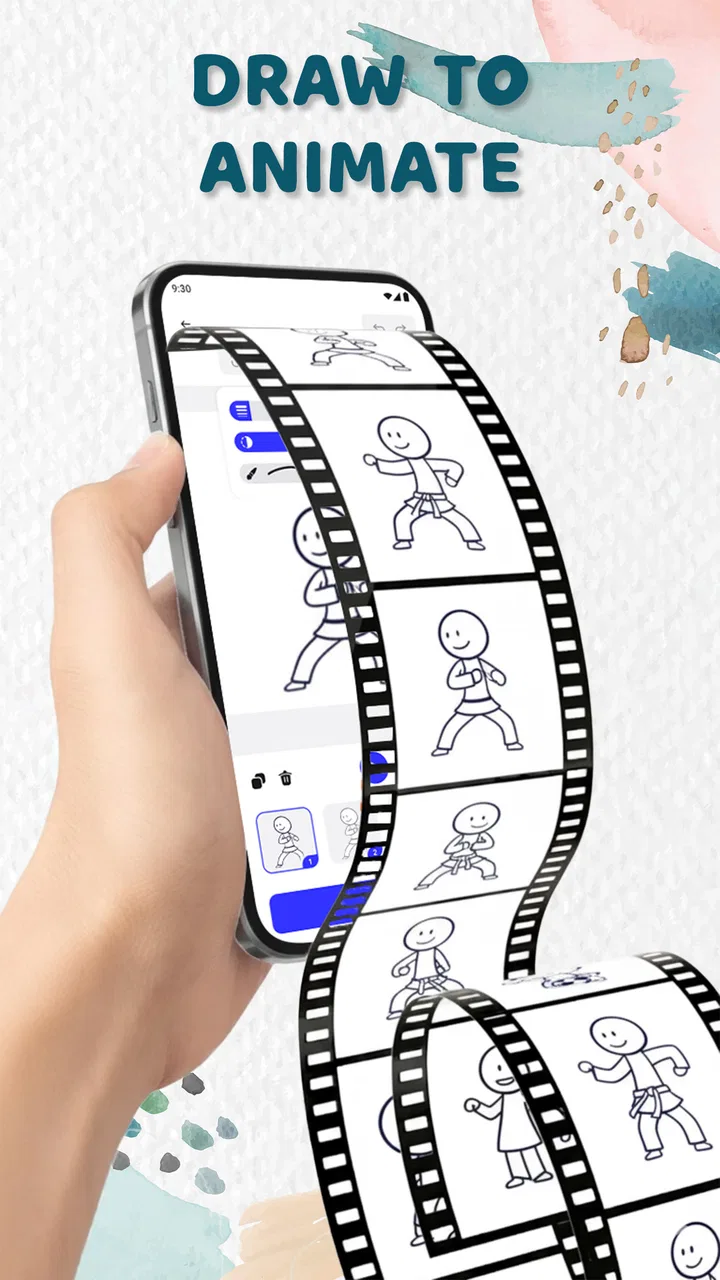
I approached Animation Draw: Flip Maker as a small drawing studio rather than a full animation suite. Its purpose is straightforward: I draw one frame, add another, and build movement by flipping through the sequence. That simplicity is the main attraction. I do not need to understand a complicated timeline before making something move, which makes the app approachable for casual sketchers, younger creators, and anyone who wants to test an idea quickly.
At the same time, a flipbook workflow asks for patience. Every action is built around separate drawings, so a tiny change may mean editing one frame at a time. In my experience, that gives the process a pleasantly hands-on feel, but it also makes the app less suitable for people expecting the precision, automation, and layered control of professional animation software. The important question is not whether it replaces those tools; it does not. The better question is whether its focused approach makes first experiments easier.
How the drawing workspace feels to use
The clearest strength is the direct relationship between drawing and movement. Instead of hiding the result behind a complex production setup, the app encourages me to think in small visual steps: position an object, alter it slightly, then check how the change reads when the frames play together. That immediate loop is useful for learning the basic idea of animation, especially for someone who understands drawing but has never worked with keyframes.
You May Also Like

 Blood Strike: 2.5 Anniversary
Blood Strike’s Loadouts Turn Every Drop Into a Tactical Gamble
A close look at Blood Strike’s custom loadouts: how fast access to signature weapons reshapes its battle royale rhythm, rewards preparation, and narrows the gap between fights.

 Pandora - Music & Podcasts
Pandora’s Music Is Easy to Start, but Harder to Recover
Pandora’s strength is its low-effort path from a seed to a station. Its weak spot is how much confidence it asks you to place in connection, setup, and quiet recovery.

 8 Ball Pool
 Is Built on Rivalries, Rematches, and Routine
A close look at the rivalries, rematches, shared routines, and unanswered safety questions that turn a quick pool match into a persistent mobile community.

 Samsung Music
’s Quiet Strength Is Playing What You Already Own
Its reach comes less from spectacle than from dependable access to a personal library. That simplicity is both the app’s strongest retention engine and its ceiling.

 AccuWeather: Weather Radar
AccuWeather Review: A Quick, Clear Forecast for Everyday Decisions
For everyday plans, the best forecast is the one you can understand quickly. AccuWeather makes rain timing, radar, and local conditions easy to act on, with a few trade-offs.

 Hill Climb Racing
Why Hill Climb Racing Still Turns Crashes Into One More Run
A tiny car, a bumpy hill and one more upgrade: Hill Climb Racing keeps resurfacing because its simple chaos makes every near-miss feel personal.
More From Our News Desk



I found this kind of structure easier to explain than a conventional animation editor. A child can understand that each page contains a different stage of the drawing, while an adult can use the same method for rough storyboards, expressive doodles, or a quick motion test. The app’s Art & Design classification fits that role well: it is closer to a creative sketchbook with movement than to a video-editing workstation.
Navigation matters a lot in an app built for repeated frame changes. A good flipbook tool should let me move from one drawing to the next without losing sight of the sequence, and the appeal here comes from keeping the central task uncomplicated. I can concentrate on what changes between frames instead of spending most of my time configuring a production pipeline.
That uncluttered approach can also help people who become overwhelmed by dense interfaces. There are fewer conceptual layers to learn than in a typical desktop animation package, so the first session feels less like studying software and more like trying a drawing exercise. I would still recommend starting with a very short action, such as a blinking eye or a bouncing mark, because a long sequence can become difficult to manage once many nearly identical frames accumulate.
Readability is more than large controls
For me, readability in this type of app means being able to tell which frame I am editing, what has already been drawn, and how the sequence changes when played. Those distinctions are especially important for users with limited attention, young artists, or anyone working on a small phone screen. A simple interface helps, but the visual difference between the current frame and neighboring frames is just as important as the drawing tools themselves.
My practical advice is to zoom in only when refining a small detail, then return to the full composition before moving on. A frame that looks clean at close range may appear to jump when viewed at normal size. This habit also reduces unnecessary redrawing, because I can judge whether a movement is actually visible instead of polishing details that disappear during playback.
The app is more welcoming to beginners than a feature-heavy alternative, but simplicity does not automatically solve every navigation issue. Flipbook animation has its own vocabulary: frames, timing, repetition, and visual continuity. A first-time user may still need a few attempts to understand why a drawing that looks fine alone feels awkward in motion. That is a learning curve caused by the medium itself, not necessarily by a confusing interface.
Motor control, visual comfort, and creative precision
Drawing on a phone or tablet places the quality of the result partly in the user’s hands. Someone with steady finger control can sketch directly, while another person may find small movements tiring or frustrating. I would treat this app as more forgiving for loose, expressive animation than for highly precise line work. The flipbook idea works beautifully with simple shapes and broad gestures, but it becomes demanding when every frame requires exact alignment.
A useful workaround is to design around motion that tolerates small differences. A waving stick figure, expanding star, or bouncing blob can remain charming even when the lines are not perfectly identical. By contrast, animating a detailed character with strict proportions requires much more control and repeated correction. This is one of the most important trade-offs: the app makes animation approachable, but the phone screen still limits how comfortably I can create fine detail.
For users with motor difficulties, the best workflow is to reduce the number of decisions made per frame. I would begin with a bold silhouette, keep the subject near the center, and change only one feature at a time. That creates a manageable rhythm and makes mistakes easier to spot. Planning the action on paper first can also reduce the number of taps and redraws inside the app.
Visual comfort depends on the kind of artwork being made. A calm sequence with clear shapes is easier to follow than a crowded drawing where many lines change at once. I recommend using strong separation between the subject and its background when possible, because the movement should be readable during playback, not just attractive in a still frame. This is particularly helpful for viewers who struggle to distinguish subtle changes.
I would not describe the app as a specialist accessibility tool, and I would not choose it for someone who needs a highly configurable interface or a workflow designed around alternative input methods. Still, its narrow purpose can be an advantage: there are fewer creative controls competing for attention, and a user can focus on one visible action rather than learning an entire production environment.
A workflow that reduces fatigue
My preferred method is to create the first and last positions of an action before filling in the middle. For example, I might draw a ball at the top of a bounce and then at the bottom, leaving the intermediate movement for later. This gives the sequence a destination and prevents me from making many frames without knowing whether the action has enough range.
I also avoid changing several things at once. If the character moves, turns, stretches, and changes expression in every frame, it becomes hard to identify which alteration caused a visual problem. Separating those decisions makes troubleshooting easier and reduces the physical effort of repeated corrections. It is a small discipline, but it turns a casual drawing tool into a more useful learning environment.
Another practical tip is to keep early projects deliberately short. A compact loop is easier to replay, inspect, and revise than a long scene. It also makes the app more suitable for users who tire quickly or have limited time. Once the movement feels natural, I can extend the idea instead of committing to a large sequence from the beginning.
Where it fits into everyday situations
I can imagine using the app during a short break to sketch an animated greeting, test a character’s walk, or show a child how a still drawing becomes movement. It also works for a teacher introducing the principle of frame-by-frame animation without requiring a computer lab full of complicated software. The low-pressure format encourages experimentation because the first result does not need to look polished to be informative.
For a family activity, one person could draw the main figure while another suggests the next pose. That shared process is more accessible than asking everyone to learn a professional editor. The important thing is to agree on a simple action before starting. “Make the flower open” is a better first project than “create a complete animated story,” because the goal remains visible throughout the session.
For social content, the app may be useful when the charm comes from handmade movement rather than perfect production. A quick doodle that wiggles, waves, or changes expression can feel personal. However, I would not rely on it as my main tool for a polished promotional animation, a complex explainer, or a project that needs advanced compositing. In those situations, a more specialized editor offers better control and a smoother path from rough idea to finished media.
The free price removes an important barrier for curious users. I can try the drawing process without treating the first attempt as a financial commitment. That makes it easier to recommend to a friend who wants to explore animation casually. The content rating is Everyone, which also suits its general creative purpose, although younger users may still benefit from guidance when learning how to organize frames and avoid frustration.
The app comes from Fusion Flow Tech and has reached over half a million installs, with a 4.4 average from around 6,700 ratings. Those figures suggest that the concept has found an audience beyond a tiny group of enthusiasts. I would still interpret popularity carefully: a large audience does not mean the workflow will suit every drawing style, especially if someone needs advanced controls or a desktop-sized canvas.
When another option makes more sense
Compared with a standard drawing app, this tool has a clearer path from sketch to movement. A normal sketching application may offer better brushes or canvas control, but it often leaves animation as an afterthought. Here, the frame-by-frame idea is the center of the experience, so I spend less time deciding how to assemble the sequence.
Compared with a professional animation editor, the advantage is approachability rather than depth. A larger editor is usually the better choice for detailed layers, complex timing, camera work, audio coordination, or a production that must be revised by several people. If I already know those tools and need precision, the simpler flipbook approach may feel restrictive rather than liberating.
Compared with paper and a physical flipbook, the app is easier to revise and replay. I can test the movement without physically shuffling pages, and digital drawing makes experimentation less wasteful. Paper still has a tactile quality that some learners prefer, though, and it can be a better starting point for someone who finds a screen distracting or uncomfortable.
The app runs on Android seven or later, so compatibility covers older supported devices as well as newer phones and tablets. That is helpful for families or schools using mixed hardware. Still, the practical experience will depend on screen size and touch responsiveness. A larger tablet should feel more comfortable for detailed work, while a small phone is better suited to simple, bold animation.
Remaining barriers before you commit
The main barrier is repetition. Frame-by-frame animation rewards care, but it can also feel slow when I want a result immediately. There is no shortcut around the need to make movement visible across successive drawings. Users who prefer automatic transitions, motion presets, or a timeline that handles interpolation may lose patience quickly.
Another barrier is consistency. A character can drift in size or position from one frame to the next, particularly when drawing with a finger. That can be part of the handmade appeal, but it can also make a sequence look accidental. I would choose this app for expressive rough animation before choosing it for perfectly stable graphics.
Editing decisions should be made carefully. When I notice a weak frame, it is tempting to redraw several surrounding frames immediately. A better approach is to replay the sequence, identify the first moment where the movement stops reading clearly, and fix that point first. This prevents a small issue from turning into a full restart and is especially valuable for users who find repeated corrections tiring.
There is also a difference between making an animation and presenting one. The drawing process is the reason to use the app, but a finished project may need to be shared or incorporated into another project. If the final destination is a larger video workflow, I would plan that step before investing hours in a detailed sequence. The app is strongest as a place to create and test an idea, not necessarily as the entire production pipeline.
The current version is 1.0.7, and that early version number is worth keeping in mind when judging expectations. I would approach it as a focused creative tool whose value comes from its core activity, rather than assuming it will match the breadth of mature animation platforms. That does not make it a poor choice; it simply makes the intended audience clearer.
My inclusive verdict
I recommend Animation Draw: Flip Maker to beginners, casual artists, families, and educators who want a direct introduction to frame-by-frame movement. Its free access, Everyone rating, and supported Android range make it easy to try in a variety of everyday contexts. More importantly, the app gives the user a concrete creative task: draw a change, inspect the result, and improve the next frame.
Its inclusive strength is focus. People who feel intimidated by professional animation software may find the smaller workflow easier to approach, while users with limited time can make a short loop instead of committing to a large project. Bold shapes, short sequences, and planned poses can also reduce the precision and stamina demands of drawing every detail repeatedly.
Its limitations are equally clear. It is not my first choice for intricate artwork, highly controlled timing, complex scenes, or creators who need extensive customization. Users with motor or visual needs that require specialized controls should test the interface carefully before relying on it for an important project. The app can support a simpler creative context, but it should not be mistaken for a dedicated accessibility solution.
My final recommendation is to start with a tiny animation and judge the experience by how comfortable the repeated drawing feels. If a bouncing shape or changing face makes you want to keep experimenting, the app has done its job. Its real value is making animation feel like a sequence of manageable sketches rather than an intimidating technical discipline. For that specific purpose, I think it is a friendly and worthwhile place to begin.
FAQs for Animation Draw: Flip Maker
01What is Animation Draw: Flip Maker?
Animation Draw: Flip Maker is a versatile app designed for creating hand-drawn animations on your mobile device. It offers tools for sketching frame-by-frame animations, allowing users to bring their artistic ideas to life. With an intuitive interface, it's suitable for both beginners and experienced animators.
02Is Animation Draw: Flip Maker free to use?
Yes, Animation Draw: Flip Maker offers a free version with basic features. However, for access to advanced tools and additional resources, users can opt for in-app purchases or a premium subscription. The free version is a great way to explore the app's capabilities before committing to a purchase.
03What are the key features of Animation Draw: Flip Maker?
Animation Draw: Flip Maker includes a wide range of features such as frame-by-frame editing, onion skinning for better animation flow, customizable brushes, and layers for complex compositions. It also supports exporting animations in various formats, making it easy to share your creations.
04Can I use Animation Draw: Flip Maker offline?
Yes, Animation Draw: Flip Maker can be used offline, allowing you to work on your animations without an internet connection. However, certain features, like cloud storage and some online resources, will require connectivity. Offline functionality ensures you can animate anywhere, anytime.
05Is Animation Draw: Flip Maker suitable for beginners?
Absolutely! Animation Draw: Flip Maker is designed with an intuitive user interface, making it accessible for beginners. The app offers tutorials and guides to help new users get started with animation. As users gain experience, they can explore more advanced features to enhance their skills.
Pros
- Intuitive interface for beginners
- Wide range of drawing tools
- Smooth animation playback
- Supports multiple layers
- Export options to GIF or video
Cons
- Limited color palette options
- No cloud saving feature
- Occasional app crashes
- Ads can be intrusive
- Lacks advanced editing tools

Animation Draw: Flip Maker
Gallery